
Knowledge note
正在加载知识笔记
正在加载知识笔记
Knowledge note
课前回顾:
  1.函数:跟在select后面使用,对指定的列进行操作
    字符串函数  数值函数  日期函数  判断函数
  2.JDBC:是java操作数据库的技术,是一套标准,规范
    a.四大核心对象:
      DriverManager:类
      Connection:连接对象
      Statement:执行sql的对象
      ResultSet:处理结果集对象
    b.jdbc开发步骤:
      注册驱动: Class.forName("Driver的全限定名")
      获取连接: DriverManager.getConnection(数据库url,用户名,密码)
      准备sql: 写sql语句
      获取执行sql对象:connection.createStatement()
      执行sql:
           executeUpdate(sql) 针对于增删改操作
           executeQuery(sql) 针对于查询
      处理结果集:
           针对于增删改操作不需要处理结果集
           针对于查询需要处理结果集:
                 next()
                 getxxx(列名)
      关闭资源: close
  3.PreparedStatement:预处理对象
    a.获取: connection.preparedStatement(sql)
    b.特点: 支持sql语句中给值写占位符?
    c.为?赋值: setxxx(第几个?,具体的值)
    d.执行sql:
      executeUpdate() 针对于增删改操作
      executeQuery() 针对于查询

今日重点:
   1.除了C3P0连接池和事务的特性以及隔离级别,都是重点
1.问题描述:
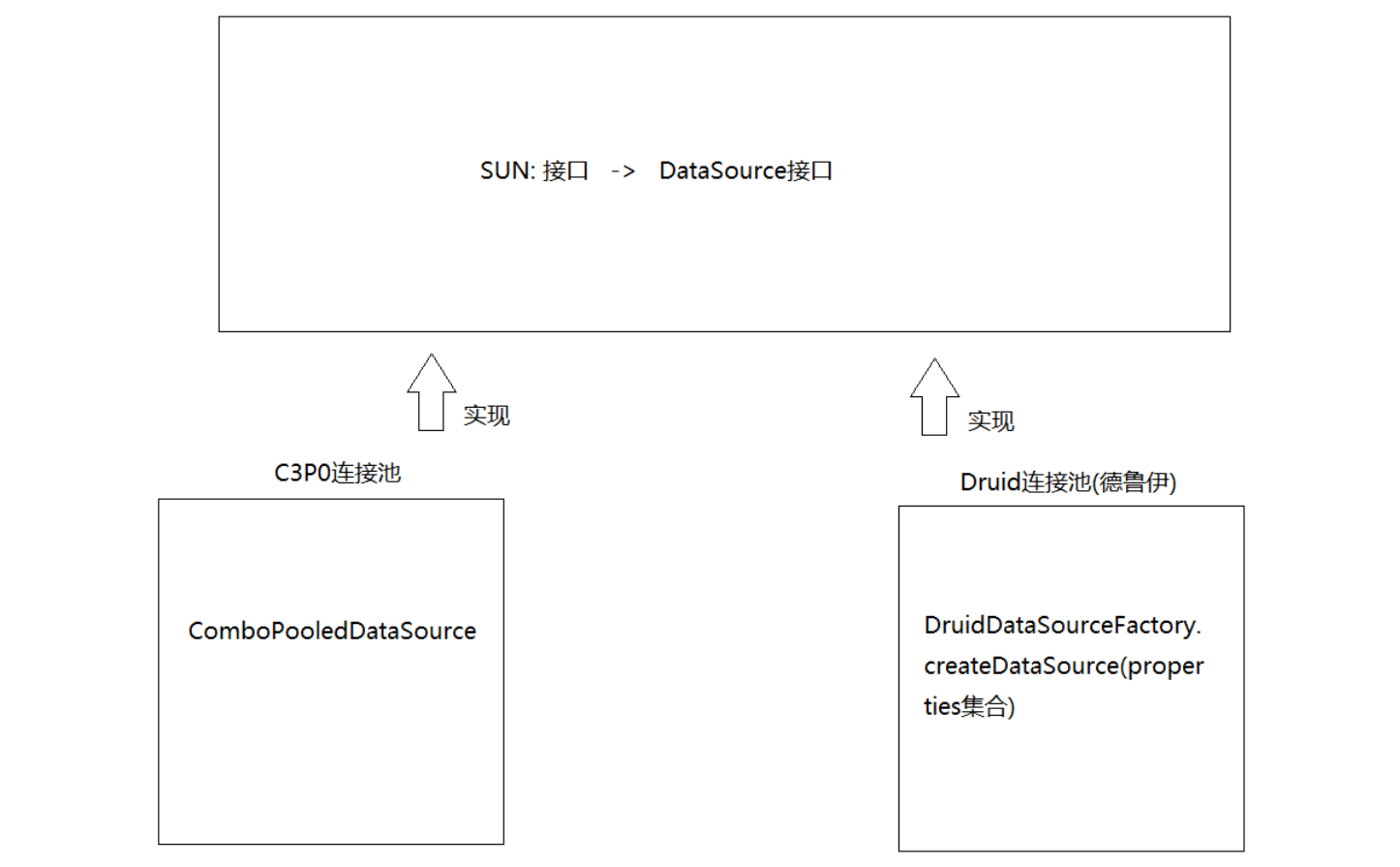
  我们之前每个操作都需要先获取一条新的连接对象,用完之后就需要销毁,如果频繁的去创建连接对象,销毁连接对象,会耗费内存资源

2.解决:提前先准备好连接对象,放到一个容器中,然后来了操作直接从这个容器中拿连接对象,用完之后还回去
 数据库准备
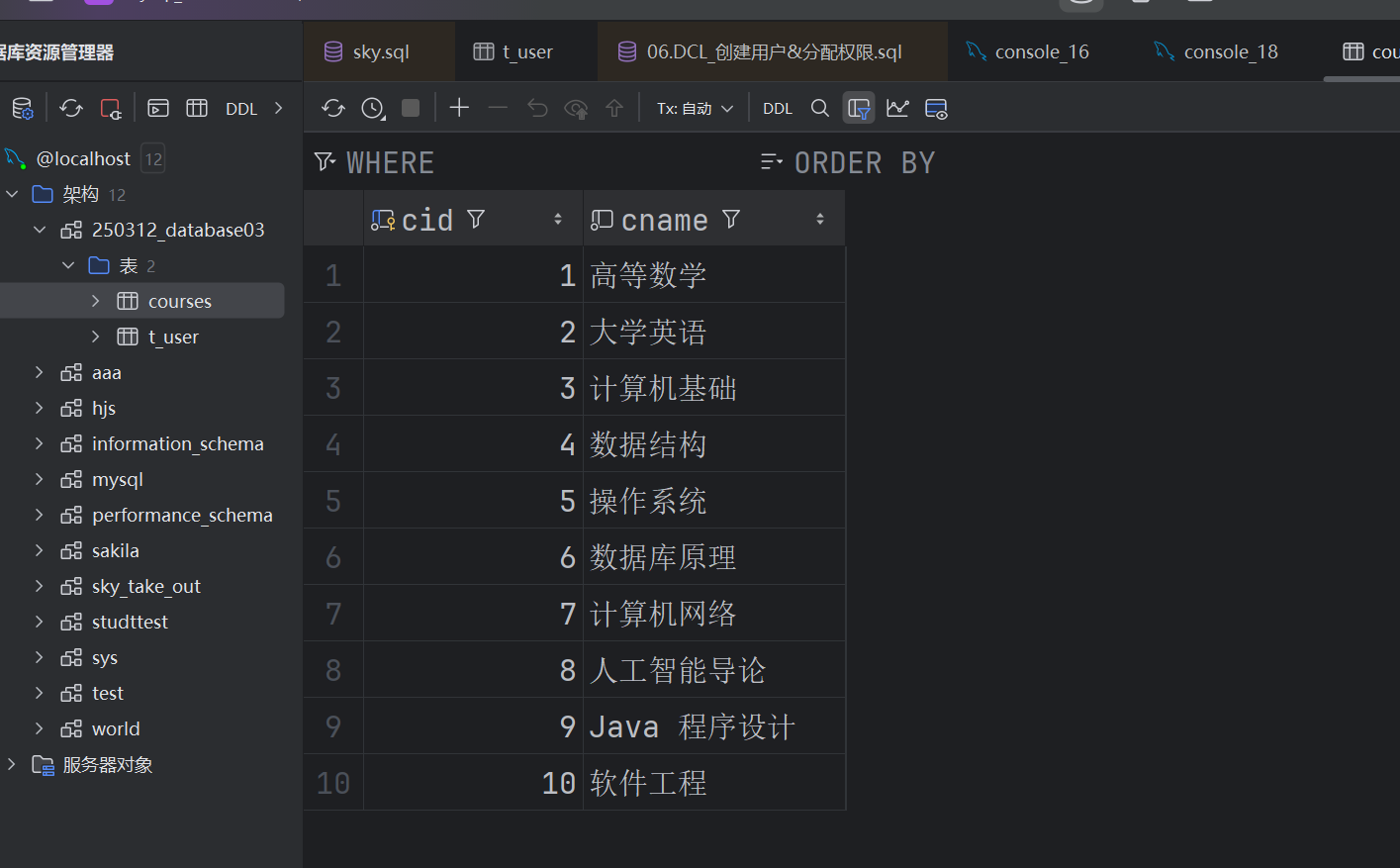
数据库准备
-- 创建名为 courses 的表
CREATE TABLE courses (
  cid INT PRIMARY KEY AUTO_INCREMENT COMMENT '课程编号',
  cname VARCHAR(50) NOT NULL COMMENT '课程名称'
) COMMENT='课程表';

INSERT INTO courses (cname) VALUES
('高等数学'),
('大学英语'),
('计算机基础'),
('数据结构'),
('操作系统'),
('数据库原理'),
('计算机网络'),
('人工智能导论'),
('Java 程序设计'),
('软件工程');
1.导入C3P0的jar包
  c3p0-0.9.5.2.jar
  mchange-commons-java-0.2.12.jar
2.创建C3P0的配置文件(xml):
   a.取名:c3p0-config.xml(名字不能错)
         右键->新建->file-> xxx.xml
   b.写xml的配置:
   <c3p0-config>
    <!-- 使用默认的配置读取连接池对象 -->
    <default-config>
        <!--  连接参数 -->
        <property name="driverClass">com.mysql.cj.jdbc.Driver</property>
        <property name="jdbcUrl">jdbc:mysql://localhost:3306/250312_database03?rewriteBatchedStatements=true</property>
        <property name="user">root</property>
        <property name="password">123456</property>

        <!--
          连接池参数
          初始连接数(initialPoolSize):刚创建好连接池的时候准备的连接数量
          最大连接数(maxPoolSize):连接池中最多可以放多少个连接
          最大等待时间(checkoutTimeout):连接池中没有连接时最长等待时间,单位毫秒
          最大空闲回收时间(maxIdleTime):连接池中的空闲连接多久没有使用就会回收,单位毫秒
         -->
        <property name="initialPoolSize">5</property>
        <property name="maxPoolSize">10</property>
        <property name="checkoutTimeout">2000</property>
        <property name="maxIdleTime">1000</property>
    </default-config>
</c3p0-config>
C3P0实现类:ComboPooledDataSource
public class C3P0Utils {
    private C3P0Utils() {
    }
    private static DataSource dataSource;
    static {
        try {
            dataSource = new ComboPooledDataSource();
        } catch (Exception e) {
            e.printStackTrace();
        }
    }

    public static Connection getConnection() {
        Connection connection = null;
        try {
            //从连接池中获取连接对象
            connection = dataSource.getConnection();
        } catch (SQLException e) {
            e.printStackTrace();
        }

        return connection;
    }

    public static void close(Connection connection, Statement statement, ResultSet resultSet) {
        if (resultSet != null) {
            try {
                resultSet.close();
            } catch (SQLException e) {
                e.printStackTrace();
            }
        }

        if (statement != null) {
            try {
                statement.close();
            } catch (SQLException e) {
                e.printStackTrace();
            }
        }

        if (connection != null) {
            try {
                //归还连接对象
                connection.close();
            } catch (SQLException e) {
                e.printStackTrace();
            }
        }

    }
}
package com.hjs.b_pool;

import org.junit.Test;
import utils.C3P0Utils;
import utils.JDBCUtils;

import java.sql.Connection;
import java.sql.PreparedStatement;

public class Demo01C3P0  {
    @Test
    public void insert() throws Exception{
        //获取连接对象
        Connection connection= C3P0Utils.getConnection();
        //准备sql
        String sql="insert into courses(cname) values (?)";
        //获取执行sql对象
        PreparedStatement pst=connection.prepareStatement(sql);
        for (int i = 0; i < 100; i++) {
           pst.setObject(1,"课程"+i);
           //将数据一起打包到内存中
            pst.addBatch();
        }

        //执行sql
        pst.executeBatch();
        //释放资源
        JDBCUtils.close(connection,pst,null);
}

}
1.xml概述:可扩展性标记语言
a.标记语言:说白了就是文件中由标签组成-> <标签名></标签名>
b.可扩展性:说白了就是标签名可以自定义 2.标签(元素)以及属性: a.闭合标签 <开始标签 属性名="值" 属性名="值"> 可以嵌套其他标签也可以写一些文本内容 </结束标签> b.自闭合标签 <标签名 属性名="值"/> 3.注意: a.每个xml文件必须有一个根标签(最外层标签) b.标签名不能叫做xml,不要以数字开头
1.概述:是阿里巴巴开发的
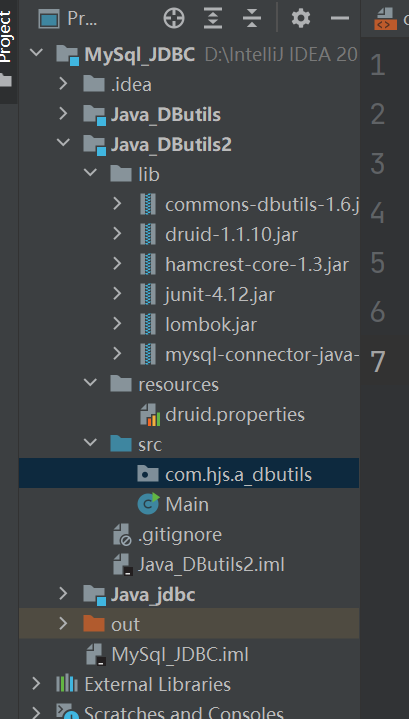
2.导入jar包:
  druid-1.1.10.jar
3.编写配置文件:properties配置文件
  a.取名为:xxx.properties
  b.文件中的配置:
    driver=com.mysql.cj.jdbc.Driver
url=jdbc:mysql://localhost:3306/250312_database03
username=root
password=123456
initialSize=5
maxActive=10
maxWait=1000

4.怎么读取配置文件:
  DruidDataSourceFactory.createDataSource(properties集合)
public class DruidUtils {
    private DruidUtils(){}
    private static DataSource dataSource;
    static {
        try {
            Properties properties = new Properties();
            InputStream in = DruidUtils.class.getClassLoader().getResourceAsStream("druid.properties");
            properties.load(in);
            dataSource = DruidDataSourceFactory.createDataSource(properties);
        } catch (Exception e) {
            e.printStackTrace();
        }
    }

    public static Connection getConnection() {
        Connection connection = null;
        try {
            //从连接池中获取连接对象
            connection = dataSource.getConnection();
        } catch (SQLException e) {
            e.printStackTrace();
        }

        return connection;
    }

    public static void close(Connection connection, Statement statement, ResultSet resultSet) {
        if (resultSet != null) {
            try {
                resultSet.close();
            } catch (SQLException e) {
                e.printStackTrace();
            }
        }

        if (statement != null) {
            try {
                statement.close();
            } catch (SQLException e) {
                e.printStackTrace();
            }
        }

        if (connection != null) {
            try {
                //归还连接对象
                connection.close();
            } catch (SQLException e) {
                e.printStackTrace();
            }
        }

    }
}
package com.hjs.b_pool;

import org.junit.Test;
import utils.DruidUtils;

import java.sql.Connection;
import java.sql.PreparedStatement;

public class Demo02Druid {
    @Test
    public void insert()throws Exception{
        //1.获取连接对象
        Connection connection = DruidUtils.getConnection();
        //2.准备sql
        String sql = "insert into courses(cname) values (?)";
        //3.获取执行sql的对象
        PreparedStatement pst = connection.prepareStatement(sql);
        //4.为?赋值
        pst.setObject(1,"蔬菜");
        //5.执行sql
        pst.executeUpdate();
        //6.释放资源
        DruidUtils.close(connection,pst,null);
    }
}
1.概述:DBUtils是简化jdbc开发步骤的工具包
2.核心对象:
  QueryRunner:执行sql -> 重点
  ResultSetHandler:处理结果集 -> 重点
  Dbutils:关闭资源,事务处理
1.构造:
  QueryRunner()
2.特点:
  a.我们需要自己维护连接对象
  b.支持占位符?
3.方法:
  int update(Connection conn, String sql, Object... params)->针对于增删改操作
             conn:连接对象
             sql:sql语句
             params:自动为sql中的?赋值 -> 直接传递给?赋予的值->传递的第一个值就自动找第一个?,以此类推
  query(Connection conn, String sql, ResultSetHandler<T> rsh, Object... params)->针对于查询
             conn:连接对象
             sql:sql语句
             rsh:处理结果集的方式,传递哪个实现类对象,就会自动按照哪个实现类对象处理结果集
             params:自动为sql中的?赋值 -> 直接传递给?赋予的值->传递的第一个值就自动找第一个?,以此类推
     @Test
    public void insert() throws Exception {
        //1.创建QueryRunner对象
        QueryRunner queryRunner = new QueryRunner();
        //2.获取连接对象
        Connection connection = DruidUtils.getConnection();
        //3.准备sql
        //String sql = "insert into category(cname) values (?)";
        //4.执行sql
        queryRunner.update(connection,"insert into category(cname) values (?)","水果");
        DruidUtils.close(connection,null,null);
    }
1.构造:
  QueryRunner(DataSource ds)
2.特点:
  a.我们不需要自己维护连接对象
  b.支持占位符?
3.方法:
  int update(String sql, Object... params)->针对于增删改操作
             sql:sql语句
             params:自动为sql中的?赋值 -> 直接传递给?赋予的值->传递的第一个值就自动找第一个?,以此类推
  query(String sql, ResultSetHandler<T> rsh, Object... params)->针对于查询
             sql:sql语句
             rsh:处理结果集的方式,传递哪个实现类对象,就会自动按照哪个实现类对象处理结果集
             params:自动为sql中的?赋值 -> 直接传递给?赋予的值->传递的第一个值就自动找第一个?,以此类推
public class DruidUtils {
    private DruidUtils(){}
    private static DataSource dataSource;
    static {
        try {
            Properties properties = new Properties();
            InputStream in = DruidUtils.class.getClassLoader().getResourceAsStream("druid.properties");
            properties.load(in);
            dataSource = DruidDataSourceFactory.createDataSource(properties);
        } catch (Exception e) {
            e.printStackTrace();
        }
    }

    /**
     * 新添加一个方法
     * 专门获取DataSource对象
     * @return
     */
    public static DataSource getDataSource(){
        return dataSource;
    }

    public static Connection getConnection() {
        Connection connection = null;
        try {
            //从连接池中获取连接对象
            connection = dataSource.getConnection();
        } catch (SQLException e) {
            e.printStackTrace();
        }

        return connection;
    }

    public static void close(Connection connection, Statement statement, ResultSet resultSet) {
        if (resultSet != null) {
            try {
                resultSet.close();
            } catch (SQLException e) {
                e.printStackTrace();
            }
        }

        if (statement != null) {
            try {
                statement.close();
            } catch (SQLException e) {
                e.printStackTrace();
            }
        }

        if (connection != null) {
            try {
                //归还连接对象
                connection.close();
            } catch (SQLException e) {
                e.printStackTrace();
            }
        }
    }
}
    @Test
    public void delete()throws Exception{
        QueryRunner qr = new QueryRunner(DruidUtils.getDataSource());
        //String sql = "delete from category where cid = ?";
        qr.update("delete from category where cid = ?",3);
    }
1.作用:将查询出来的结果集中的第一行数据封装成javabean对象
2.方法:
  query(String sql, ResultSetHandler<T> rsh, Object... params)>有参QueryRunner时使用
  query(Connection conn, String sql, ResultSetHandler<T> rsh, Object... params)->空参QueryRunner时使用
3.构造:
  BeanHandler(Class type)
  传递的class对象其实就是我们想要封装的javabean类的class对象
  想将查询出来的数据封装成哪个javabean对象,就写哪个javabean的class对象
4.怎么理解:
  将查询出来的数据为javabean中的成员变量赋值
    @Test
    public void beanHandler()throws Exception{
        QueryRunner qr = new QueryRunner(DruidUtils.getDataSource());
        //String sql = "select * from category where cid = ?";
        String sql = "select * from category";
        Category category = qr.query(sql, new BeanHandler<Category>(Category.class));
        System.out.println(category);
    }
1.作用:将查询出来的结果每一条数据都封装成一个一个的javabean对象,将这些javabean对象放到List集合中
2.构造:
  BeanListHandler(Class type)
  传递的class对象其实就是我们想要封装的javabean类的class对象
  想将查询出来的数据封装成哪个javabean对象,就写哪个javabean的class对象

3.怎么理解:
  将查询出来的多条数据封装成多个javabean对象,将多个javabean对象放到List集合中
@Test
    public void beanListHandler()throws Exception{
        QueryRunner qr = new QueryRunner(DruidUtils.getDataSource());
        String sql = "select * from category";
        List<Category> list = qr.query(sql, new BeanListHandler<Category>(Category.class));
        for (Category category : list) {
            System.out.println(category);
        }
    }
1.作用:主要是处理单值的查询结果的,执行的select语句,结果集只有1个
2.构造:
  ScalarHandler(int columnIndex)->不常用->指定第几列
  ScalarHandler(String columnName)->不常用->指定列名
  ScalarHandler()->常用 -> 默认代表查询结果的第一行第一列数据
3.注意:
  ScalarHandler和聚合函数使用更有意义
    @Test
    public void scalarHandler()throws Exception{
        QueryRunner qr = new QueryRunner(DruidUtils.getDataSource());
        //String sql = "select * from category";
        //Object o = qr.query(sql, new ScalarHandler<>());
        //String s = qr.query(sql, new ScalarHandler<String>("cname"));

        String sql = "select count(*) from category";
        Object o = qr.query(sql, new ScalarHandler<>());
        System.out.println(o);
    }
1.作用:将查询出来的结果中的某一列数据,存储到List集合中
2.构造:
  ColumnListHandler(int columnIndex)->指定第几列
  ColumnListHandler(String columnName)->指定列名
  ColumnListHandler()-> 默认显示查询结果中的第一列数据
3.注意:
 ColumnListHandler可以指定泛型类型,如果不指定,返回的List泛型就是Object类型,可以不指定泛型
    @Test
    public void columnListHandler()throws Exception{
        QueryRunner qr = new QueryRunner(DruidUtils.getDataSource());
        String sql = "select * from category";
        //Object o = qr.query(sql, new ColumnListHandler());
        //Object o = qr.query(sql, new ColumnListHandler("cname"));
        List<String> list = qr.query(sql, new ColumnListHandler<String>("cname"));
        for (String s : list) {
            System.out.println(s);
        }
    }
CREATE TABLE account(
  `name` VARCHAR(10),
  money INT
);
 @Test
    public void transfer() throws Exception {
        QueryRunner qr = new QueryRunner(DruidUtils.getDataSource());
        String outMoney = "update account set money = money - ? where name = ?";
        String inMoney = "update account set money = money + ? where name = ?";
        qr.update(outMoney,1000,"涛哥");
        //System.out.println(1/0);
        qr.update(inMoney,1000,"萌姐");
        System.out.println("转账成功");
    }
1.事务的作用:是用来管理一组操作的(一组操作中包含了多条sql语句的),使其要么全成功,要么全失败
2.注意:
  a.mysql默认自带事务的,但是mysql的自带事务,每次只能管理一条sql语句;所以想让mysql一次管理多条sql语句,需要关闭mysql自带事务,开启手动事务

3.方法:Connection中的方法:
  a.setAutoCommit(boolean autoCommit)->当参数为false,证明关闭mysql自带事务,自动开启手动事务
  b.void commit() -> 提交事务 -> 事务一旦提交,数据将永久保存,不能自动回到原来的数据了
  c.void rollback() -> 回滚事务 -> 数据将恢复到原来的样子 -> 前提是事务没有提交

4.想要让事务生效:调用的以上三个方法,必须是同一个connection对象调用
 @Test
    public void transfer(){
        Connection connection = null;
        try{
            QueryRunner qr = new QueryRunner();
            connection = DruidUtils.getConnection();
            //开启事务
            connection.setAutoCommit(false);
            String outMoney = "update account set money = money - ? where name = ?";
            String inMoney = "update account set money = money + ? where name = ?";
            qr.update(connection,outMoney,1000,"涛哥");

            System.out.println(1/0);

            qr.update(connection,inMoney,1000,"萌姐");
            //提交事务
            connection.commit();

            System.out.println("转账成功");
        }catch (Exception e){
            //回滚事务
            try {
                connection.rollback();
                System.out.println("转账失败");
            } catch (SQLException ex) {
                e.printStackTrace();
            }
            e.printStackTrace();
        }finally {
            DruidUtils.close(connection,null,null);
        }

    }
-- 开启事务
BEGIN;

UPDATE account SET money = money-1000 WHERE `name` = '涛哥';

UPDATE account SET money = money+1000 WHERE `name` = '萌姐';

-- 提交事务
COMMIT;

-- 回滚事务
ROLLBACK;
三层架构:
  表现层(Controller):专门和页面打交道,接收请求,回响应
  业务层(Service): 专门做业务处理
  持久层(Dao): 专门和数据库打交道的 -> jdbc
com.atguigu.controller
com.atguigu.service
com.atguigu.dao
com.atguigu.utils
com.atguigu.pojo
public class AccountController {
    public static void main(String[] args) {
        //创建Scanner对象
        Scanner scanner = new Scanner(System.in);
        System.out.println("请输入出钱人姓名:");
        String outName = scanner.next();
        System.out.println("请输入收钱人姓名:");
        String inName = scanner.next();
        System.out.println("请输入转账金额:");
        int money = scanner.nextInt();

        //调用service层方法,传递outName,inName,money
        AccountService accountService = new AccountService();
        accountService.transer(outName,inName,money);
    }
}
public class AccountService {
    /**
     * @param outName 出钱人
     * @param inName  收钱人
     * @param money   金额
     */
    public void transer(String outName, String inName, int money) {
        Connection connection = null;
        try {
            //获取连接对象
            connection = DruidUtils.getConnection();
            //开启事务
            connection.setAutoCommit(false);
            AccountDao accountDao = new AccountDao();
            accountDao.outMoney(connection,outName, money);
            System.out.println(1/0);
            accountDao.inMoney(connection,inName, money);

            //提交事务
            connection.commit();
            System.out.println("转账成功");

        } catch (Exception e) {
            //回滚事务
            try {
                connection.rollback();
                System.out.println("转账失败");
            } catch (SQLException ex) {
                e.printStackTrace();
            }
            e.printStackTrace();
        }finally {
            DruidUtils.close(connection,null,null);
        }
    }
}
public class AccountDao {
    public void outMoney(Connection conn,String outName, int money) throws SQLException {
        QueryRunner qr = new QueryRunner();
        String sql = "update account set money = money - ? where name = ?";
        qr.update(conn,sql,money,outName);
    }

    public void inMoney(Connection conn,String inName, int money) throws SQLException {
        QueryRunner qr = new QueryRunner();
        String sql = "update account set money = money + ? where name = ?";
        qr.update(conn,sql,money,inName);
    }
}
1.我们为啥要分层开发?
   a.好维护 -> 自己干自己的事儿,不做别人得事儿

   b.解耦
2.service层写了获取连接的代码,那么获取连接这个事儿是service层该干的嘛? 不是
3.如果不在service层中获取连接对象,我们怎么将连接对象传递给dao层的两个方法?
如果service层的事务处理和dao层的操作使用的连接对象不是同一条,那么事务怎么生效呢?
4.解决问题:
如果不传递给dao层同一条连接对象,那么我们怎么保证service层的事务处理和dao层的操作使用的连接对象是同一条呢?
  a. 将获取连接的代码以及事务管理的代码抽取到一个工具类中

  b.同时还要保证service层和dao层使用的连接对象是同一条连接对象
1.概述:容器
2.创建:
  ThreadLocal<E> 对象名 = new ThreadLocal<>()
3.方法:
  set(数据): 存数据
  get():取数据
  remove():清空ThreadLocal
4.注意:
  a.一次只能存储一个数据
  b.在一个线程中往ThreadLocal中存储数据,在其他线程中获取不到
  c.在同一个线程中往TheadLocal中存储的数据,在此线程的其他位置都能共享
  d.如果往ThreadLocal中存储数据,当前线程会和值直接绑死,只能在当前线程中获取,其他线程中获取不到
public class Demo01ThreadLocal {
    public static void main(String[] args) {
        ThreadLocal<String> tl = new ThreadLocal<>();
        tl.set("abc");
        tl.set("def");
        String s = tl.get();
        System.out.println("s = " + s);

        tl.remove();
        String s1 = tl.get();
        System.out.println("s1 = " + s1);
    }
}
public class Demo02ThreadLocal {
    public static void main(String[] args) {
        ThreadLocal<String> tl = new ThreadLocal<>();
        tl.set("abc");
        String s = tl.get();
        System.out.println("s = " + s);
        new Thread(() -> {
            String s1 = tl.get();
            System.out.println("s1 = " + s1);
        }).start();
    }
}
public class ConnectionManager {
    private static ThreadLocal<Connection> tl = new ThreadLocal<>();
    private ConnectionManager(){}

    /**
     * 从连接池中获取连接对象
     * 保存到ThreadLocal中
     */
    public static Connection getConnection(){
        /**
         * 先从ThreadLocal中获取连接对象
         * 如果为null,证明当前线程还没在ThreadLocal中存储
         * 所以直接从连接池中获取连接对象,保存到ThreadLocal中
         */
        Connection connection = tl.get();
        if(connection == null){
            connection = DruidUtils.getConnection();
            tl.set(connection);
        }
        return connection;
    }

    /**
     * 开启事务
     */
    public static void begin() throws SQLException {
        //获取连接对象
        Connection conn = getConnection();
        conn.setAutoCommit(false);
    }

    public static void commit() throws SQLException {
        //获取连接对象
        Connection conn = getConnection();
        conn.commit();
    }
    public static void rollback() throws SQLException {
        //获取连接对象
        Connection conn = getConnection();
        conn.rollback();
    }

    /**
     * 释放资源
     */
    public static void close() {
        //获取连接
        Connection connection = getConnection();
        //释放资源
        DruidUtils.close(connection, null, null);
        //从ThreadLocal中移除连接
        tl.remove();
    }
}
public class AccountService {
    /**
     * @param outName 出钱人
     * @param inName  收钱人
     * @param money   金额
     */
    public void transer(String outName, String inName, int money) {

        try {

            //开启事务
            ConnectionManager.begin();

            AccountDao accountDao = new AccountDao();
            accountDao.outMoney(outName, money);
            System.out.println(1/0);
            accountDao.inMoney(inName, money);

            //提交事务
            ConnectionManager.commit();
            System.out.println("转账成功");

        } catch (Exception e) {
            //回滚事务
            try {
                ConnectionManager.rollback();
                System.out.println("转账失败");
            } catch (SQLException ex) {
                e.printStackTrace();
            }
            e.printStackTrace();
        }finally {
            ConnectionManager.close();
        }
    }
}
public class AccountDao {
    public void outMoney(String outName, int money) throws SQLException {
        QueryRunner qr = new QueryRunner();
        String sql = "update account set money = money - ? where name = ?";
        qr.update(ConnectionManager.getConnection(),sql,money,outName);
    }

    public void inMoney(String inName, int money) throws SQLException {
        QueryRunner qr = new QueryRunner();
        String sql = "update account set money = money + ? where name = ?";
        qr.update(ConnectionManager.getConnection(),sql,money,inName);
    }
}
如果不考虑隔离性,事务存在3中并发访问问题。
a)存在:0个问题。
b)解决:3个问题(脏读、不可重复读、虚读)
安全和性能对比
安全性:serializable > repeatable read > read committed > read uncommitted
性能 : serializable < repeatable read < read committed < read uncommitted
常见数据库的默认隔离级别:
MySql:repeatable read
Oracle:read committed
show variables like '%isolation%';
或
select @@tx_isolation;
设置数据库的隔离级别
set session transactionisolation level 级别字符串
级别字符串:readuncommitted、read committed、repeatable read、serializable
例如:set session transaction isolation level read uncommitted;
读未提交:readuncommitted
A窗口设置隔离级别
AB同时开始事务 -> begin
A 查询
B 更新,但不提交
A 再查询?-- 查询到了未提交的数据
B 回滚
A 再查询?-- 查询到事务开始前数据
读已提交:read committed
A窗口设置隔离级别
AB同时开启事务
A查询
B更新、但不提交
A再查询?--数据不变,解决问题【脏读】
B提交
A再查询?--数据改变,存在问题【不可重复读】
可重复读:repeatable read
A窗口设置隔离级别
AB 同时开启事务
A查询
B更新, 但不提交
A再查询?--数据不变,解决问题【脏读】
B提交
A再查询?--数据不变,解决问题【不可重复读】
A提交或回滚
A再查询?--数据改变,另一个事务
串行化:serializable
A窗口设置隔离级别
AB同时开启事务
A查询
B更新?--等待(如果A没有进一步操作,B将等待超时)
A回滚
B 窗口?--等待结束,可以进行操作
- 原子性(Atomicity)原子性是指事务是一个不可分割的工作单位,事务中的操作要么都发生,要么都不发生。
- 一致性(Consistency)事务前后数据的完整性必须保持一致。
- 隔离性(Isolation)事务的隔离性是指多个用户并发访问数据库时,一个用户的事务不能被其它用户的事务所干扰,多个并发事务之间数据要相互隔离,正常情况下数据库是做不到这一点的,可以设置隔离级别,但是隔离级别越高,效率会非常低。
- 持久性(Durability)持久性是指一个事务一旦被提交,它对数据库中数据的改变就是永久性的,接下来即使数据库发生故障也不应该对其有任何影响。
如果不考虑隔离性,事务存在3中并发访问问题。(如果隔离级别低,事务跟事务之间有可能互相影响)

1. 脏读:一个事务读到了另一个事务未提交的数据.
2. 不可重复读:一个事务读到了另一个事务已经提交(update)的数据。引发另一个事务,在事务中的多次查询结果不一致。
3. 虚读 /幻读:一个事务读到了另一个事务已经提交(insert)的数据。导致另一个事务,在事务中多次查询的结果不一致。
总结:
  我们最理想的状态是:一个事务和其他事务互不影响

  但是如果不考虑隔离级别的话,就会出现多个事务之间互相影响

  而事务互相影响的表现方式为:
    脏读
    不可重复读
    虚读/幻读
知识笔记会随着实践和认知变化持续更新,不代表最终结论。